web
You’re offline. This is a read only version of the page.
close
Skip to main content

Notifications

Announcements

Community site session details

Community site session details

Session Id :
Engage with the Community
Suggested Answer

course of learning

(1) ShareShare
ReportReport
Posted on by
  1. Which of the Power Platform tools should I start learning first?
  2. Are we expected to learn all the tools (Power BI, Power Apps, Power Pages, Power Automate, Copilot Studio), or should we just pick one to focus on?
  3. Is the learning experience conducted as live classes, or are the lessons provided as videos that we can watch at our own pace?
I would appreciate clarification on these points so I can make the most informed decision on how to begin my learning journey.
I have the same question (0)
  • Michael E. Gernaey Profile Picture
    Super User 2025 Season 2 on at
     
    So the base of all of this is Dataverse (even for integrations to Power BI, however Power BI is NOT required to have Dataverse, the others are).
     
    I usually suggest people start like this
     
    Base Understanding of the Platform as a whole, this way you understand the components that exist I the other services, such as forms, relationships, data, Ux, roles, security, tables etc.
    • Dataverse - Get started using Microsoft Dataverse - Training | Microsoft Learn
       
    • Power Platform - Training for Power Platform | Microsoft Learn
      • On this page at the bottom will be some starting learning that covers understanding the platform and power apps and power bi. This is all for you to leverage at your pace, and will have you build things.
         
    • Power Platform - All Training (filtered) Browse all training - Training | Microsoft Learn
      • You can filter by technology and Role even 
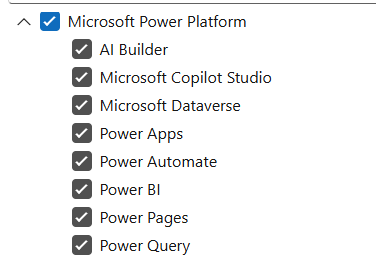
      • You easily filter down what you want to focus on in the order and what helps is to filter on Types
        • where learning paths will give you the best overall, because it combines together into long training sessions of hours long, walking you through many modules that have been brough together as a topic
        • I added a link at the very bottom to show what I mean
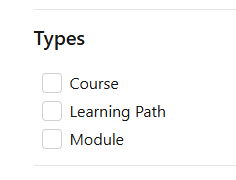
     
    From there I suggest doing some learning in Power Apps, for both Canvas and Model Driven App
    • These both use Dataverse. Event for Canvas Apps that do not connect to Dataverse, if you use Solutions, they are stored in Dataverse so its good to understand solutions, which again is part of the base platform, not specifically to an App (whether its Power BI, Power Apps or Power Automate
     
     
    And Honest Power BI can be anywhere. - Browse all training - Training | Microsoft Learn
     
    My reasons are that each layer above builds on the other or uses the other.
     
    Here are some really good Modules
     
    You can also do a free App in a Day or Daily workshops here
     
    I hope that helps

    If these suggestions help resolve your issue, Please consider Marking the answer as such and also maybe a like.

    Thank you!
    Sincerely, Michael Gernaey
  • Tomac Profile Picture
    Moderator on at
    It really depends on your background and previous experience, as well as what you want to accomplish using these tools.
     
    For me, I have a background in application development and needed to automate various processes for my team so I first learned Power Automate, then needed to build reports on the data I was generating so I learned Power BI.
     
    You don't need to learn every component if you don't intend to use them (I personally haven't touched the AI Builder, Power Pages, or Power Query yet) but again, this really comes down to what you want to accomplish.
     
    I do recommend an in-person class with a small class size for personalized initial training on each tool, and then build and learn from there. As you try more advanced things you'll learn how they work. These forums were a great help to me in the beginning, not just asking questions but learning from the questions others asked as well. Beyond that, there are a ton of great blog posts and videos on how to do specific things that you can use on an as-needed basis.
  • Suggested answer
    Pol Escolano Profile Picture
    on at

    Hi,
    From my experience, the most important foundation before diving into any specific Power Platform tool is understanding databases and data modeling. Almost everything you build in the Power Platform—whether it’s in Power BI, Power Apps, Power Pages, Power Automate, or even Copilot Studio—relies on working with data effectively. Having strong data skills will make it much easier to learn and use any of these tools, so learn how databases work.

    Once you have that base, I’d recommend focusing first on the tool that’s most relevant to your current work or the career path you want to pursue. You don’t have to learn all the tools at once—start with one, build confidence, and then expand into others as your needs or interests grow.

    As for the learning format, it depends on the specific program or course you choose. Some are delivered as live sessions, others as on-demand videos you can watch at your own pace, and some offer a mix of both.

    Hope this helps you choose the right starting point for your learning journey!

    —Pol

  • Suggested answer
    shetanshudharsharma Profile Picture
    on at
     
    Let me answer query wise.
     
    1. Which of the Power Platform tools should I start learning first? I think it is always great to start with Power Automate because it will help you irrespective of the fact whether you want to become a Power Platform professional or not. Even with a free version that comes with Windows 10 and 11, you will be able to automate multiple mundane day to day tasks and increase your productivity. The best part- It is easy to learn and no prior coding experience is required.
    2. Are we expected to learn all the tools (Power BI, Power Apps, Power Pages, Power Automate, Copilot Studio), or should we just pick one to focus on? My controversial answer for this one would be that you should deep dive in any one while you must have at least beginner level knowledge in all others since all these tools are interrelated and interoperable. Knowing them all would be like GOD level stuff but being an expert in any one and having a little knowledge about others is also a goody good.
    3. Is the learning experience conducted as live classes, or are the lessons provided as videos that we can watch at our own pace? My 2 cents here are that there are so many great videos on you tube giving real hands on lessons. Watch them and try to do as much hands on as possible. Wherever stuck, ask questions on this community and you will get your issues resolved in no time. :) Learn at your own pace, do not overwhelm yourself and i promise you in 6 months you would be on a totally different level. Stay consistent and one baby step at a time. Hope that helps.
  • Suggested answer
    David He Profile Picture
    on at
    1) consider joining the Free Power Up Program - https://powerup.microsoft.com/
    - get an overview of the full power platform stack then figure out which one you are interested in and dive deeper
     
    2) Consider attending a user group event, meet with passionate power platform developers in your local area - https://community.powerplatform.com/usergroups/
    - learn more from real people in the space!
     
    3) YouTube - omg tons of free Power Platform content there!

Under review

Thank you for your reply! To ensure a great experience for everyone, your content is awaiting approval by our Community Managers. Please check back later.

Helpful resources

Quick Links

Telen Wang – Community Spotlight

We are honored to recognize Telen Wang as our August 2025 Community…

Announcing our 2025 Season 2 Super Users!

A new season of Super Users has arrived, and we are so grateful for…

Congratulations to the July Top 10 Community Leaders!

These are the community rock stars!

Leaderboard > Engage with the Community

Last 30 days Overall leaderboard
