Share
Share Report
Hi All,
I am trying to use the patch function to add files to rows of data with a file column in Dataverse. The issue is, I cannot find a way to get all the files from my collection properly uploaded to their related rows. Below is some code I am using:
ForAll(
colPurchaseList,
Patch(
'AUNA Purchase Request Line Items',
Defaults('AUNA Purchase Request Line Items'),
{
Item: ThisRecord.Item,
'Item Description': ThisRecord.Description,
'PR#': _newPR,
Quantity: ThisRecord.Quantity,
Cost: ThisRecord.UnitPrice,
'Total Cost': ThisRecord.TotalCost,
'Unit of Measure': ThisRecord.UnitofMeasure,
Currency: ThisRecord.Currency,
Taxable: ThisRecord.Taxable,
Hyperlink: ThisRecord.Hyperlink,
GUID: ThisRecord.GUID
}
)
);
ForAll(
colPurchaseList,
ForAll(
ThisRecord.Attachment,
Patch(
'AUNA Purchase Request Line Items',
LookUp('AUNA Purchase Request Line Items', GUID = ThisRecord.GUID),
{
'PR Document': {
FileName: ThisRecord.FileName,
Value: ThisRecord.FileContent
}
}
)
)
);
The issue is it only inserts files into the first row created but not all of them. Despite trying to link the GUID value between records, all my files end up in the first row.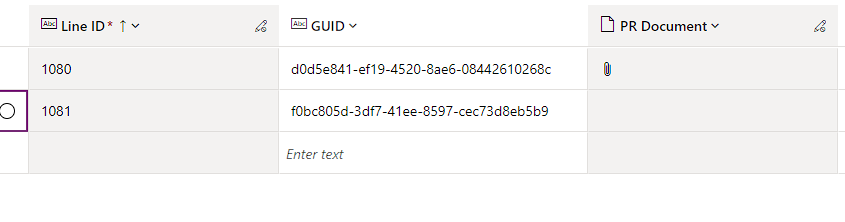

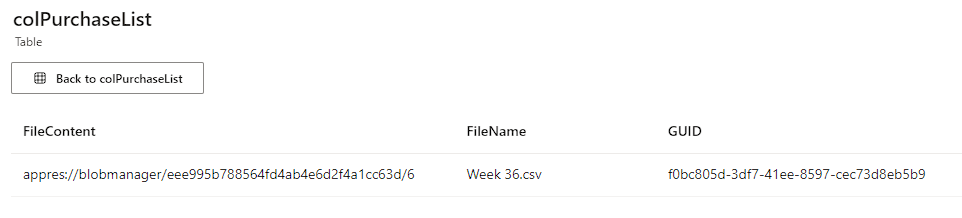
Does anyone know what I am doing incorrectly here? any feedback is greatly appreciated!
I have the same question (0)
 All responses (
 Answers (